
Guide
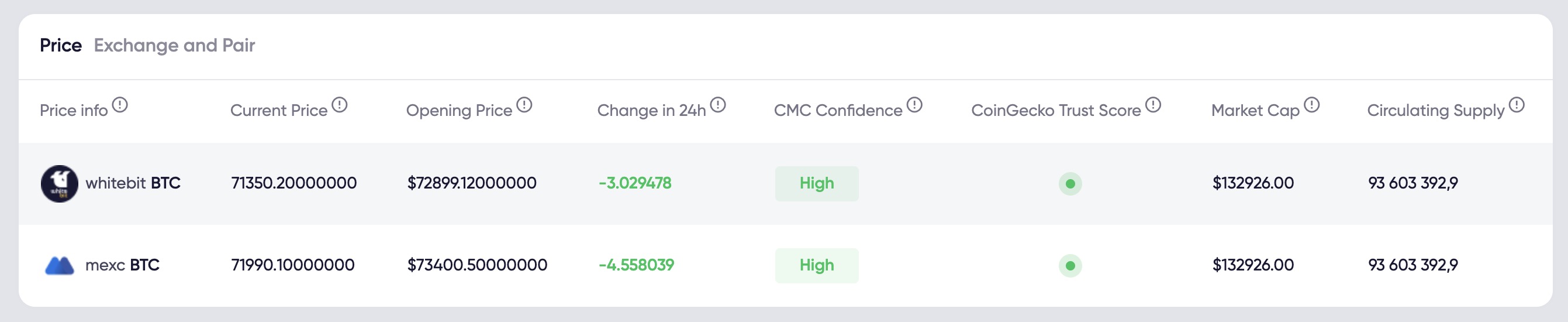
Here we see general information about which exchanges the token is traded on, in this case, on the XT and MEXC exchanges.

'Current Price' indicates the current price of the token, along with the opening price.
'Change 24H' shows the price change compared to the previous day, indicating the percentage by which it has changed.
Also displayed are 'CMC Confidence' and 'CoinGecko Trust Code', as well as market cap and total circulating supply. This data is sourced from CoinGecko.
In general, there are two sections. The first section is dedicated to trading volume, denoted as 'Volume', and the second section pertains to 'Balance'.
So, 'Volume Total' indicates the total trading volume across all exchanges, with the current trading volume highlighted in gray square, representing the volume traded over the past day.
'Volume 24H' is 743 thousand, which is the trading volume over the last 24 hours on the exchange. Then follows the volume traded by the bot and the actual trading volume on the exchange.
'Volume 7D' shows the volume over the past week, for the previous 7 days. The total volume is updated once a day. The trading volume by the bot and the real trading volume across all exchanges are indicated.
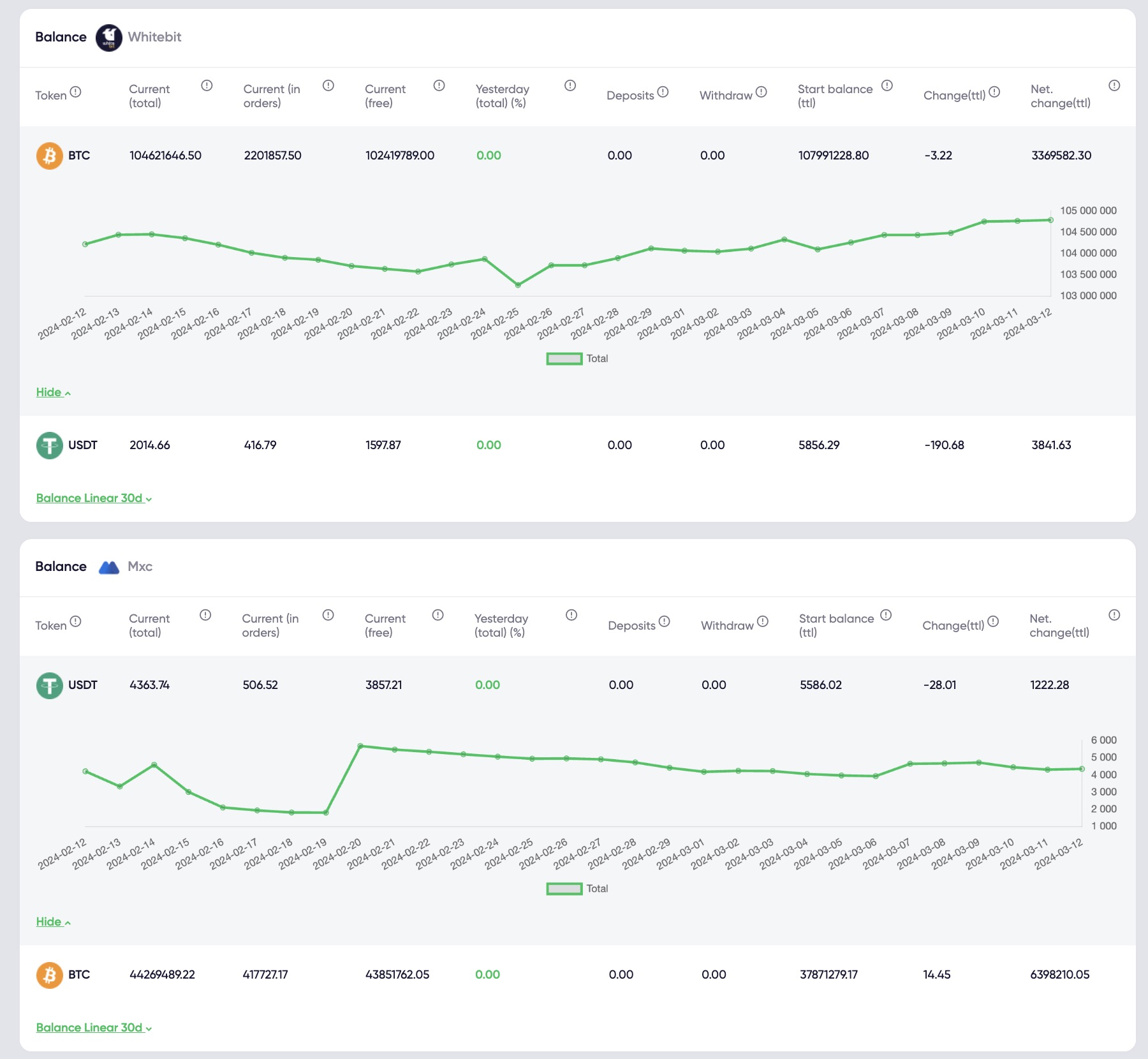
Next, we see 'Volume Exchange and Pair'. This provides volume data, spread data, for each exchange, for each pair. In this case, we have two exchanges, two pairs. In the first column, we see general information: the current spread on one exchange is 1.6%, on the second - 0.6%, with a depth of 5% down and 5% up.
Then follows information about 'Volume 24H', which is the volume over the past 24 hours on this exchange, where it amounts to 880, with 380 traded by the bot. Similarly, the volume over the past 7 days is indicated, both total and trading volume by the bot and actual on each exchange. There are two tabs, and this is detailed for each exchange. The Instagram image shows volume by days for the past 30 days. We have the information. Hovering over the histogram bar allows you to see how much the bot made and what the actual volume was in this section.
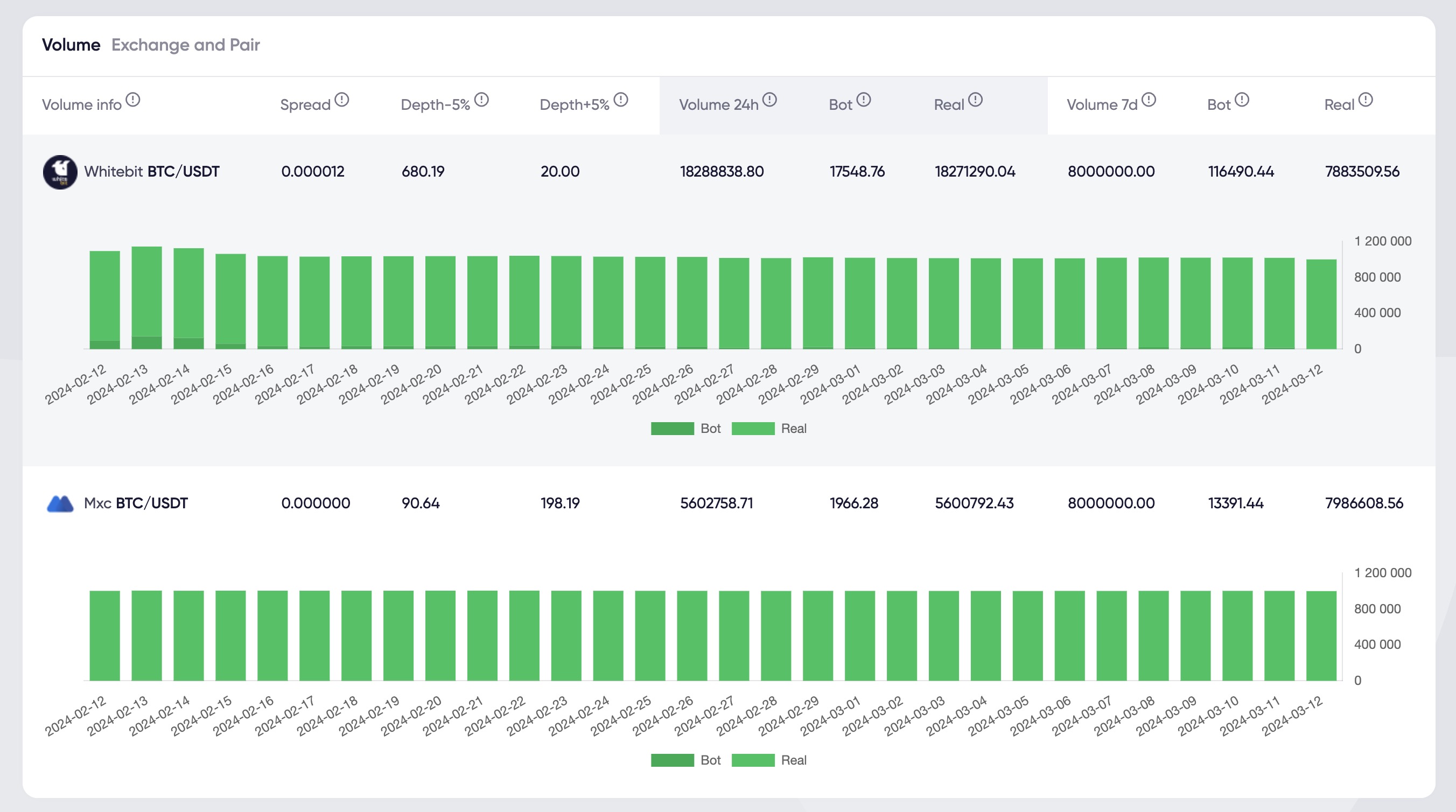
The next section is "Total Balance", which is displayed for all exchanges. Here we can see the overall balance across all exchanges.
"Current Total" shows the current balance, which is currently $225,730 across all exchanges. It then indicates how much funds are locked in orders and how much is available for operations - currently 0, but typically this shows the change in "Current Total Balance" compared to the previous day. There is also a "7D Total" indicator, reflecting how the balance has changed over the last 7 days.
The next column is "Deposits and Withdrawals". Here, with cumulative totals, it shows how much funds have been deposited into the accounts and how much has been withdrawn from them. For example, if a client withdraws $100 today and $200 tomorrow, these data are summed up, representing the cumulative total from the start of operation until the current moment.
"Start Balance Total" displays the initial balance, i.e., the amount in USDT at the start of operations.
"Change Total" shows how the overall balance has changed since the start of operations until the current moment.
"Net Change" reflects the net change in balance, excluding deposits and withdrawals. If tokens are sold, "Net Change" will show a positive change in balance, indicating its growth. In the case of buying tokens, "Net Change" can be negative. This applies to USDT.
Similarly, equivalent information will be presented for all other currencies, such as BNB, ETH, etc. Several columns with data will be provided for each currency. The next flow of information presents similar data: the overall balance at the current moment, how much funds are locked in orders, how much is available, as well as changes, including deposits and withdrawals.
At the bottom, we see "Total USDT Balance without Tokens", which shows the overall balance excluding cryptocurrencies like Ethereum or Bitcoin. All funds are converted to USDT and displayed in this column.
"Total USDT Balance with Tokens" reflects the total wallet balance with all assets on all exchanges, including tokens converted to USDT.
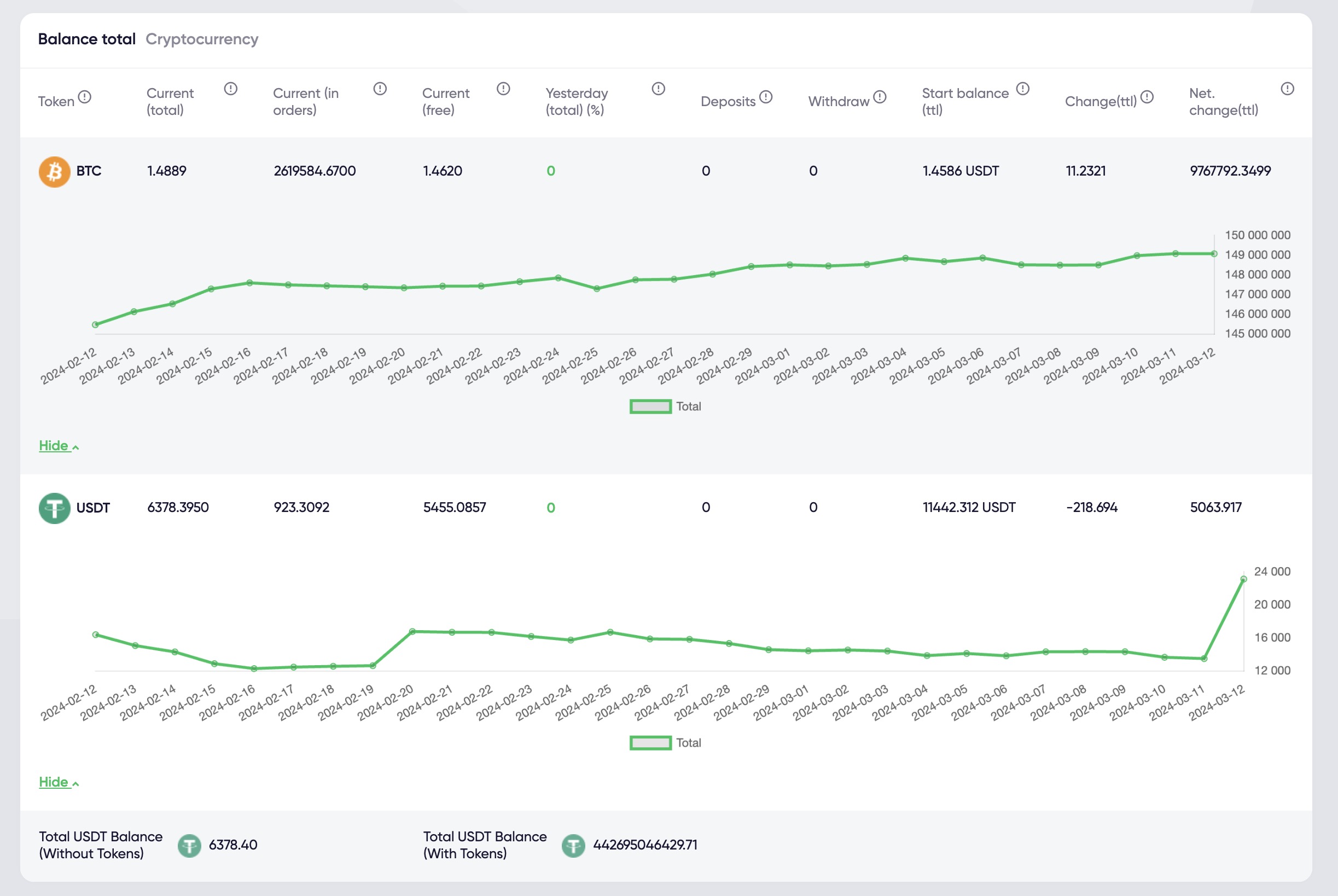
The next two graphs provide information for each exchange, including the current balance on the exchange, funds in orders, available funds, changes compared to the previous day, changes over the week, deposits, withdrawals, as well as the initial exchange balance, balance changes, and net balance change excluding withdrawals and deposits. Similarly, information is presented for tokens: if there are five tokens, data will be outlined for each of them. A separate note pertains to the "TOTAL" balance, which will be supplemented with information on the average token sale price, denoted as "Average Token Sale". This parameter will show the average price at which all tokens were sold, reflecting changes, including token sales or buybacks.